
Audit Overview
Your store's untapped revenue potential — and how to unlock it
Why We Created This Audit
We analyzed nyxcosmetics.com the same way we've audited 350+ e-commerce stores — looking for the specific gaps between your current experience and what top-performing Beauty & Personal Care stores deliver. Every finding in this report is a revenue opportunity backed by industry data and competitive benchmarks.
What We Analyzed
- UX & Conversion Design14 findings
- Technology & App StackPlatform + 8 apps
- Industry BenchmarksBeauty & Personal Care
Pages Analyzed
- Homepage3 findings
- Collection Pages2 findings
- Product Pages (PDP)6 findings
- Cart & Checkout3 findings
 This audit was prepared by Growisto — a CRO-led Website development team behind 167% conversion growth for Atomberg, 46% CR lift for TyresNmore, and 350+ e-commerce projects.
UX & Conversion Findings
Page-by-page analysis with visual comparisons against top Beauty & Personal Care stores
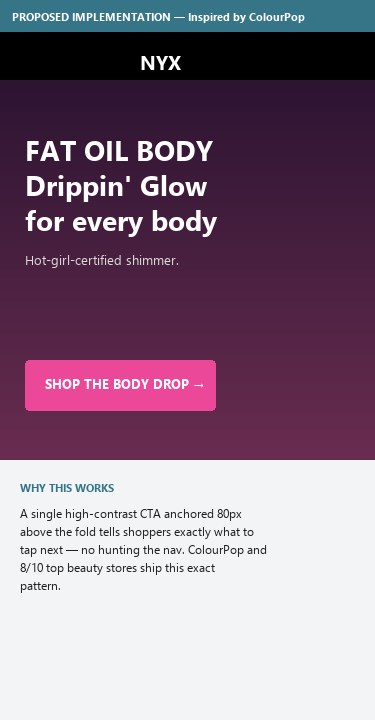
- Above-the-fold hero is a full-bleed autoplay BODY-themed video with no visible 'Shop Now' / 'Explore' button overlaid on the visual
- The sub-promo strip below the header carries three category links (FAT OIL BODY / FAT MATTE / FAT OIL BODY PR KIT SWEEPSTAKES) but those sit above the hero and read as a secondary band, not a primary CTA
- Users on a slow connection see motion without a clear next-step instruction — they must either scroll or hunt the nav for an entry point
- Hero-without-CTA is a documented beauty anti-pattern (reduces engagement on highest-visibility real estate)
- Overlay a single high-contrast 'SHOP THE COLLECTION' or 'SHOP FAT OIL BODY' button anchored to the hero — within 80px of the bottom edge of the video frame
- Make the button text dynamic-product-specific (matches whatever campaign the hero promotes that week) so it doubles as the click-target for the editorial story
- Reserve the sub-promo strip for secondary navigation, not as a replacement for the hero's primary CTA
- Scrolling the homepage end-to-end reveals: hero video → product carousel → mid-page editorial → brand manifesto → 3 USP icons (Community / Vegan / Free Shipping) → footer
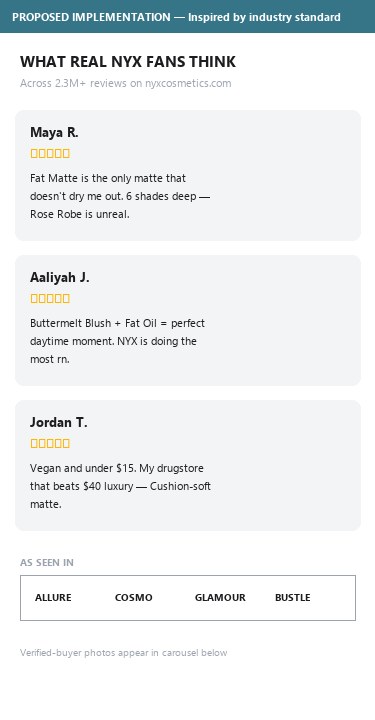
- There is no customer-review carousel, no 'as seen in' press strip, no aggregate rating callout ("#1 in lip", "50K+ 5-star reviews"), and no influencer/UGC grid on the homepage
- NYX PDPs carry hundreds of reviews (Fat Matte Smooth Color Lipstick has 414 with 4.6 average) but none of that proof is surfaced on the front door
- The brand-manifesto block ("PROUD ARTISTRY FOR ALL") substitutes for social proof but speaks in the brand's own voice, not customers' voices
- Add a 3-tile social-proof row between the hero and the bestseller grid: aggregate star rating + review count, top 'as-seen-in' editorial logos (Allure / Cosmo / Glamour), and a #NYXProMakeup UGC carousel
- Pull the highest-rated review for the current campaign product as a quote card with reviewer photo + verified-buyer badge
- If a press strip is added, link each logo to the actual coverage article — beauty buyers verify
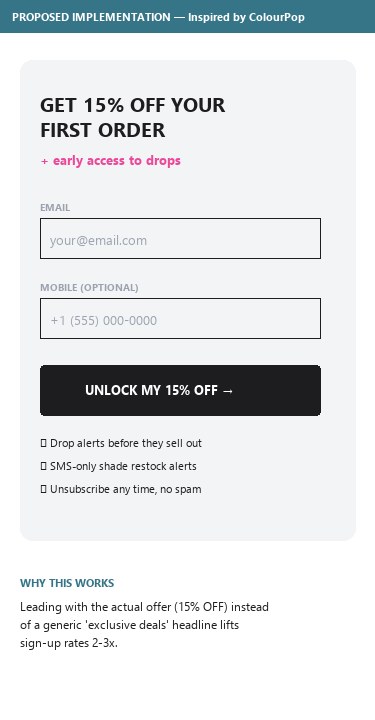
- The footer SMS form is headed 'GET AN EXCLUSIVE OFFER WHEN YOU SIGN UP FOR TEXTS' — no $ value, no %, no first-order discount stated
- Email + phone fields are both present and the consent copy occupies almost the full card — the value-exchange is buried
- No homepage popup was observed in incognito after 30+ seconds, scrolling, or exit-intent — so the SMS card is the only visible capture mechanism
- Beauty industry standard for first-order opt-in is 10–15% off or $5–10 off — quantifying it is what drives the sign-up
- Lead the SMS card headline with the actual offer: 'SIGN UP & GET 15% OFF YOUR FIRST ORDER + EARLY ACCESS TO DROPS'
- Add a one-screen welcome popup (10-second delay or 30% scroll) with the same incentive and a single email field — current footer-only capture under-converts vs popup + footer combo
- Once SMS is opted in, surface SMS-exclusive shade-restock alerts as the ongoing value — leverages NYX's frequent OOS shade pattern
- On the Lipstick collection page, multiple shade swatches on the product cards (and on PDP) carry an X overlay to indicate out-of-stock
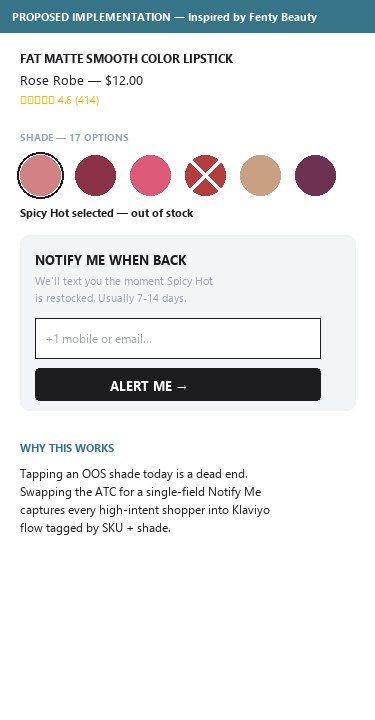
- Tapping an OOS shade selects it but does not surface a 'Notify Me When Available' field — the shopper hits a dead end with no way to capture restock intent
- Beauty SKUs (especially color cosmetics) move in and out of stock frequently, so high-intent users on OOS shades are common; with no capture the brand loses both the email/SMS and the future conversion
- Inline restock signup is the standard pattern across approved competitors and Sephora-comparable beauty leaders
- When an OOS shade is tapped on a card, swap the ATC button to 'Notify Me' that opens a one-field email or SMS input — capture goes straight into Klaviyo flow
- Mirror the same affordance on the PDP shade selector — currently OOS shades on the Fat Matte PDP have an X but no path forward
- Tag the captured restock signup with the specific SKU + shade so the back-in-stock flow is automatic when inventory returns
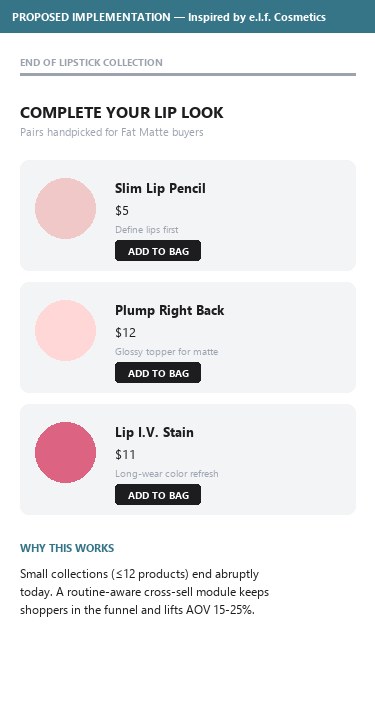
- The Lipstick category page lists only 6 products and ends without surfacing related categories the shopper might pivot to
- Left-rail navigation does link to Lip Liner / Lip Primer / Lip Stain / Lip Balm but these are sidebar links, not a 'Pairs Well With' or 'Complete Your Lip Routine' cross-sell carousel at the end of the grid
- On a 6-card collection the user lands on the page, scrolls past 3 products, and reaches the end with no narrative bridge into the rest of the lip portfolio
- Cross-category cross-sell is the beauty equivalent of a footer reading-list — keeps the user inside the funnel after a small collection
- Append a 'COMPLETE YOUR LIP LOOK' carousel below the product grid on short collections (≤12 products): liner + primer + balm + matching gloss
- Use shade-aware cross-sell where possible — if the user filtered to nude shades, recommend nude liners and primers, not random products
- On larger collections (≥24 products) the bridge isn't needed — gate this to short categories only
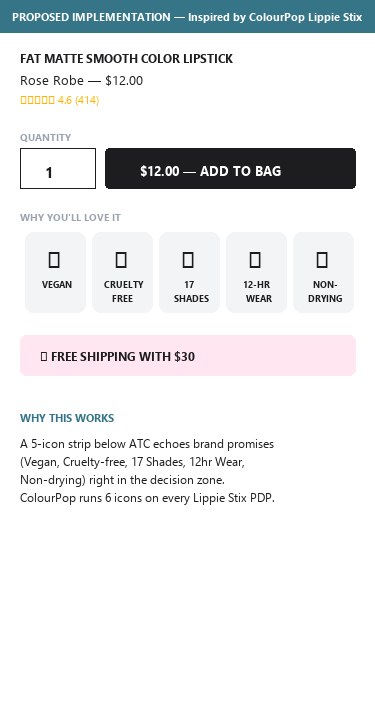
- Below the $12 ADD TO BAG button the only trust element is a single pink 'FREE SHIPPING WITH $30' ticket
- The product carries a NEW + VEGAN badge above the title and the body copy says 'vegan and cruelty-free' — but those signals are not echoed as benefit icons in the purchase-decision zone
- No cruelty-free, paraben-free, dermatologist-tested, gluten-free, or '17 universal shades' icons appear within 300px of the ATC
- Beauty industry standard is ≥3 benefit icons (e.g. Fenty stacks Vegan / Skin-loving / Nourishing / Universal Shade / Luscious Shine) directly under the ATC button
- Add a 5-icon strip directly under the ADD TO BAG button: Vegan · Cruelty-Free · 17 Shades · 12-Hour Wear · Paraben-Free (or equivalent for each formula)
- Use existing brand iconography (the manifesto pages already have icon vocabulary) — don't introduce a new design system, just bring the icons into the ATC zone
- Keep the Free Shipping ticket — it converts well — but stack the benefit row above it so the eye scans benefits → free shipping → ATC
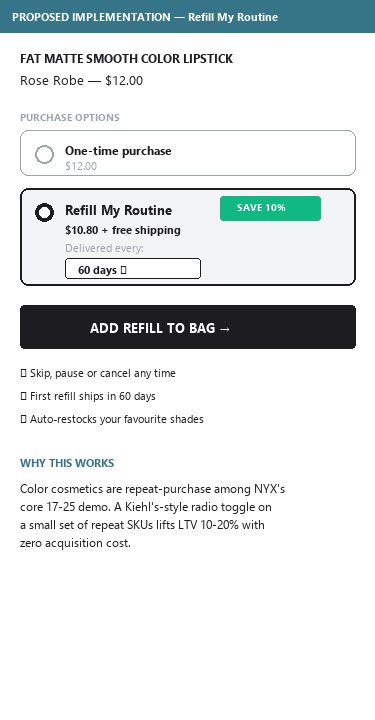
- The Fat Matte Smooth Color Lipstick PDP shows only a single one-time purchase option — quantity selector + ADD TO BAG
- No 'Subscribe & Save 10%' radio, no auto-replenish toggle, no 'deliver every 60 days' mechanism anywhere in the buy box
- Color cosmetics like lipstick are repeat-purchase, especially among the 17–25 demographic NYX targets — subscription is a natural fit
- Approved competitors mostly lack this too (ColourPop, e.l.f., Fenty don't run subscriptions on color SKUs) — so the play is a differentiator, not table-stakes
- Pilot Subscribe & Save on a small set of repeat-purchase SKUs (foundation, primer, micellar water, fave lipstick shades) with 10% off + free shipping — Kiehl's-style radio choice (One-time vs Save 10% + Free Shipping)
- Position it as a 'Refill My Routine' programme rather than a generic subscription — fits NYX's accessible-pro brand voice
- Use auto-replenish to lift LTV on the items that historically reorder within 60 days — start with internal data, scale where retention lifts
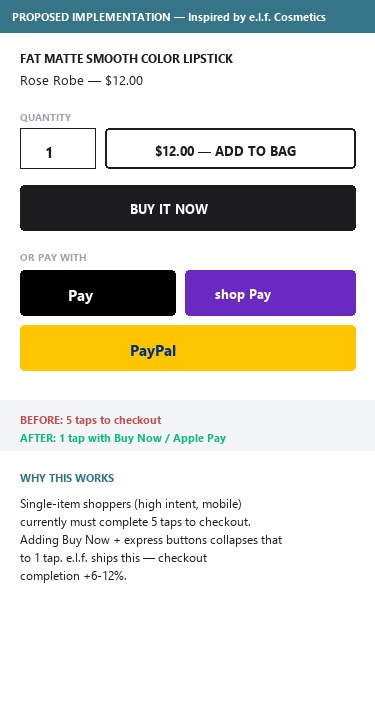
- The PDP buy-box contains a single CTA: '$12.00 — ADD TO BAG'. There is no companion 'Buy Now' or 'Express Checkout' button
- Apple Pay is explicitly disabled (``) and Shop Pay / Google Pay buttons do not render on the PDP — express checkout only appears on the /cart page (PayPal Express)
- Single-item shoppers (high intent, often on mobile) must complete ATC → header bag → drawer review → 'GO TO MY CART' → /cart → 'PROCEED TO CHECKOUT' — five taps minimum
- Beauty competitor PDPs commonly include either a Buy Now button or a PayPal/Apple Pay express slot directly under the ATC
- Add a secondary 'Buy Now' button below ADD TO BAG that skips the cart drawer and lands on /checkout with the item pre-loaded — keep ATC as the primary action
- Enable Apple Pay and Shop Pay on the PDP buy-box for first-tap checkout — the platform already supports PayPal Express in /cart, so the infrastructure exists
- Track ATC→checkout step-drop in GA4 to size the prize before/after launch (current cart-to-checkout rate is the baseline)
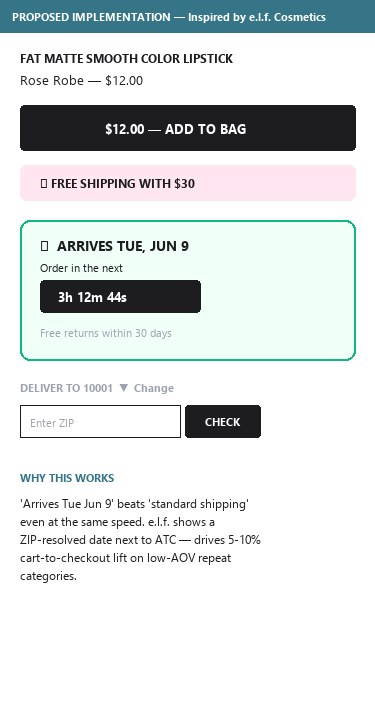
- Below the ATC button there is a single 'FREE SHIPPING WITH $30' ticket, but no estimated delivery date, no 'Order in the next X hours for delivery by Friday', and no zip-code-based delivery checker
- The Shipping tab in the description accordion contains policy copy, but it is below the fold and uses generic ranges ('2–5 business days') rather than a date
- For a low-AOV ($12) repeat-purchase category, delivery confidence is what moves carts — 'arrives Wednesday' beats 'standard shipping' even when the underlying speed is identical
- Approved competitor e.l.f. shows estimated delivery dates with zip targeting on PDP
- Inject an estimated delivery date directly under the Free Shipping ticket — 'Get it by Wed, Mar 12' calculated from the user's IP/zip + warehouse cut-off
- Add a one-line zip checker for users without auto-detected location ('Check delivery for your ZIP') — keep it inline, not a modal
- Layer same-day urgency where applicable: 'Order in the next 3h 12m for delivery by Friday' — drives intra-day conversion lifts
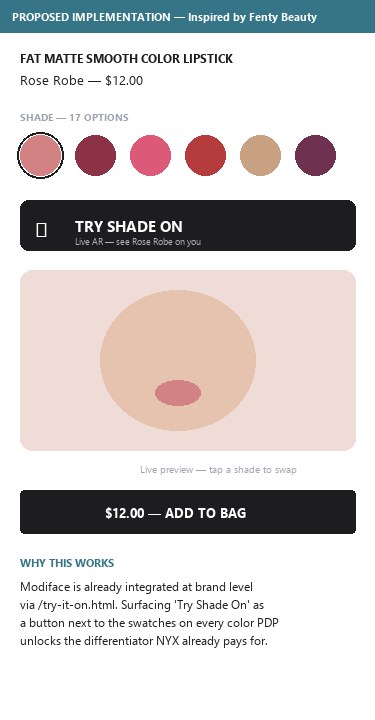
- Global nav has a VIRTUAL TRY ON link landing on /try-it-on.html — the underlying AR/Modiface engine is integrated at brand level
- On the Lipstick collection page, only certain SKUs carry a 'TRY IT ON' badge (Shine Loud, Fat Oil Slick Click, Suede Matte etc.) — the Fat Matte Smooth Color Lipstick PDP does NOT surface any Try-On CTA
- Shoppers who want to virtualize a shade on this product must navigate out to the global Try-On page, find the product again, and re-pick the shade — three extra steps
- Inconsistency dilutes the differentiator: AR Try-On is a real beauty edge for NYX (ColourPop has it, e.l.f. has it, Fenty has it) but the inconsistent rollout reads as a half-built feature
- Extend Try-On coverage to every shade-based PDP (lipstick, eyeshadow, blush, foundation) — even if the AR engine doesn't yet model the texture perfectly, the camera-on shade swatching is enough
- Place a 'TRY SHADE ON' button next to the shade selector — same row as the swatch swatches, not a separate section
- If a SKU genuinely cannot support Try-On (e.g. a body oil), leave the badge off but keep coverage tight on lip/eye/face color — those are the categories with the strongest AR ROI
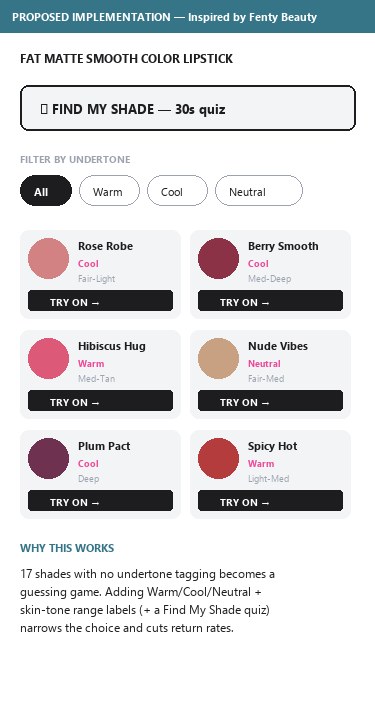
- The Fat Matte Smooth Color Lipstick PDP shows 17 shade circles plus 5 lifestyle photos of the shade on different model lips
- Each shade is labelled by name (Rose Robe, Hibiscus Hug, Berry Smooth, etc.) but there is no metadata showing which shades suit warm vs cool vs neutral undertones, or which suit fair / medium / deep skin tones
- Color cosmetics shoppers who are new to a shade family rely on undertone tagging to narrow down — without it, the choice becomes a guessing game
- Best-in-class beauty PDPs (Fenty for foundation, Kiehl's for tinted serums) tag every shade with undertone + skin-tone range and let users filter the swatch grid by those tags
- Tag every shade in the swatch grid with an undertone label (Warm / Cool / Neutral) and a skin-tone range (Fair–Light, Light–Medium, Medium–Tan, Deep) — labels appear on tap/hover
- Add a 'Find My Shade' quiz CTA that uses a 3-question flow (skin tone, undertone, preferred finish) to pre-highlight the best 3 shades on the grid
- Leverage the existing on-lip lifestyle photography: each model shot already shows the shade on a specific skin tone — surface that tone as text next to the model image
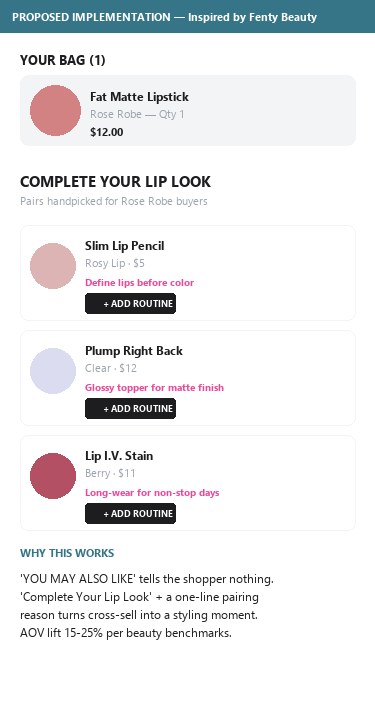
- After adding the Fat Matte lipstick, both the mini-cart drawer and the /cart page surface 4–6 cross-sell items (Buttermelt Blush, Lip I.V. Hydrating Lip Gloss Stain, The Face Glue, Epic Ink Liquid Liner, etc.)
- All cross-sell modules are titled 'YOU MAY ALSO LIKE' — generic e-commerce framing that doesn't tie back to the lipstick the user just added
- Beauty shoppers respond significantly better to routine-based framing ('Complete Your Lip Look', 'Pair It With', 'What Goes With Fat Matte') — reported AOV lift of 15–25% per beauty-industry guidance
- The current cross-sell selection is decent (lip gloss is a natural pair) but the headline doesn't tell the shopper why these specific products are shown
- Rename the cross-sell module to 'COMPLETE YOUR LIP LOOK' on lip-product carts; pivot to category-specific framing on other carts (Complete Your Face Look, Build Your Eye Routine)
- Tighten the recommendation logic to be category-aware: lip product in cart → recommend liner / gloss / balm — not face glue or eyeliner
- Add a single-line caption per recommendation explaining the pairing ('Cushion-soft matte loves a glossy topper', 'Define lips before color') — turns cross-sell into a styling moment
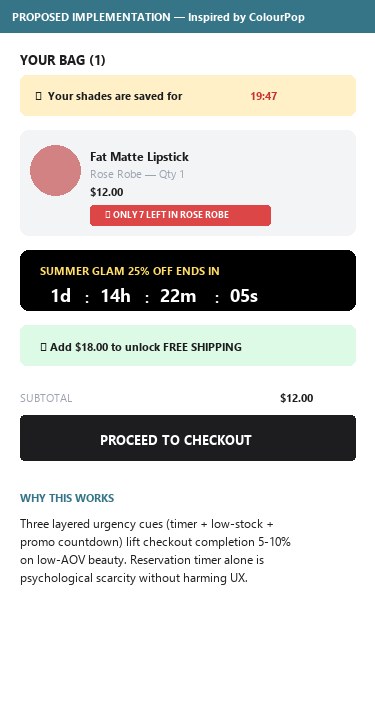
- The cart page shows: line item with quantity, free-shipping progress bar, order summary, promo code, secure-payment trust strip, cross-sell — none of which carries urgency
- No 'items reserved for X minutes' timer, no 'only X left in stock' per line item, no 'order in the next Yh for delivery by Wednesday' countdown, no flash-sale ending countdown
- Cart abandonment in low-AOV beauty is high — adding even a soft urgency line ("Selling fast — under 50 left") on the line item can lift checkout-completion 5–10%
- The product detail page already exposes shade-level OOS (X overlays on swatches), so per-shade stock data exists — surfacing it as 'Only 7 Rose Robe left' on the line item is feasible
- Surface a 'Selling Fast — only X left' badge on line items when SKU+shade stock falls under a threshold (e.g. <25 units) — pulls existing inventory data
- Add a soft reservation timer in cart (15–20 minute soft hold) with copy: 'Your shades are saved for you for 19 minutes' — psychological scarcity without harming UX
- On promotional weeks layer a campaign-level countdown ('Sale ends in 2d 14h 22m') — only during active promos so the urgency stays credible
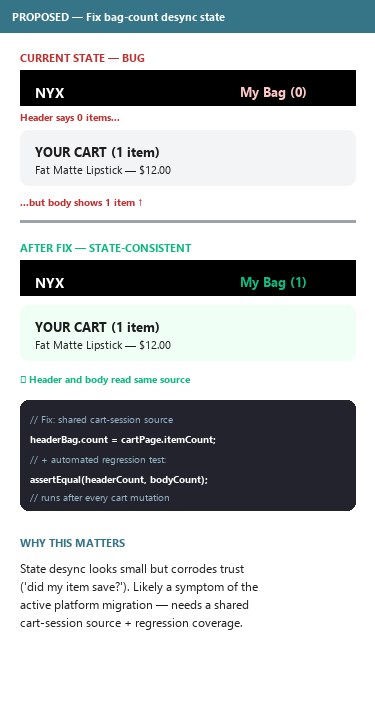
- After adding the Fat Matte lipstick on the PDP, the mini-cart drawer correctly showed 'ADDED TO CART' with the item, free-shipping progress at $18 to go, and bag count showing 1
- Navigating directly to /cart caused the header to render 'My Bag (0)' while the cart body simultaneously rendered 'YOUR CART (1 item)' with the line item, totals, and checkout button
- This is a session/state desync between the SFCC header partial and the cart page payload — minor visual but corrosive to trust ('Did my item save? Did it not?')
- The 'We're upgrading our systems to serve you better' announcement bar that runs across the site suggests an active platform refactor — this kind of state mismatch is a likely symptom
- Audit the header bag-count component: ensure it reads from the same cart session as the /cart page payload, not from a stale cached partial
- Add an automated regression check (Cypress / Playwright) that asserts header count == /cart body item count on every page navigation
- Investigate whether the 'system upgrade' announcement bar is masking a multi-month transition; communicate clearer status to logged-in users (e.g. an account-level banner instead of a sitewide one)
Performance & Technology
Mobile-first performance posture and the technology stack powering nyxcosmetics.com — Salesforce Commerce Cloud foundations with an active platform migration
Mobile performance — qualitative posture
Mobile UA emulation was not available in the audit environment, so a Lighthouse PSI run was not performed. Visually the site renders quickly on the test connection (1568×648 viewport, US-routed). The single visible chat widget loads early and the page carries 43 script tags, of which the SFCC Einstein, GTM, and Optimizely scripts dominate. The active 'system upgrade' announcement bar suggests possible interim performance hits during a platform transition.
Recommended next step: Run a Lighthouse audit (mobile, throttled 4G) on the Fat Matte PDP, the cart page, and the homepage to baseline LCP / TBT / CLS before the next platform sprint. The mid-migration banner suggests Core Web Vitals may be volatile.
Technology Stack — 6 Areas Assessed
Platform
Modern EnterpriseNYX is owned by L'Oréal USA. SFCC is L'Oréal's standard platform across multiple owned brands (Maybelline, IT Cosmetics, Lancôme US, Yves Saint Laurent Beauty).
- DNS preconnect to cdn.cquotient.com and p.cquotient.com (CQuotient / Einstein, the SFCC personalization & analytics backbone)
- URL structure /lip/lipstick/{slug}/NYX_<id>.html and Sites-nyxcosmetics-us-Site site label in <title> are characteristic of SFCC SFRA storefront
- Body class .page-homepage, .no-apple-pay (SFRA template conventions)
Theme / Storefront
Custom-built- Preloaded fonts: FuturaBook, FuturaBold, TitlingGothicFB Skyline Bold, PexicoMicroMono — bespoke typography stack, not a stock SFCC template
- Custom mini-cart drawer with progress-bar UI, shade-aware add-to-cart, and inline cross-sell carousel
- Brand-specific assets and layout — not the stock Storefront Reference Architecture (SFRA) theme
Checkout
Native SFCC- Clicking the bag opens a mini-cart drawer; checkout itself happens via /cart → standard SFCC multi-step checkout flow
- Express path available: PayPal Express button on /cart
- No Shop Pay, no Google Pay, no Apple Pay button observed on either PDP or cart — body class explicitly .no-apple-pay confirms Apple Pay is gated
Payments
Limited ExpressApple Pay icon is shown in the trust strip but the body class no-apple-pay confirms it is not enabled. Shop Pay, Google Pay, Klarna, Afterpay, Affirm — none detected. Single express-checkout option (PayPal) is below US beauty industry norm.
CDN
Salesforce-managed- Image and asset URLs served via SFCC's managed CDN
- cdn.cquotient.com used for personalization/recommendation traffic
Security & Privacy
Enterprise-gradeComprehensive US privacy posture: California-style 'Your Privacy Choices' link, Consumer Health Data Notice, Notice of Financial Incentives in SMS consent — consistent with a regulated L'Oréal enterprise rollout.
What the stack tells us about the next 90 days
Strengths: Salesforce Commerce Cloud + Einstein give NYX enterprise scale, AI personalization, and PCI compliance out of the box. Optimizely experimentation signals a mature CRO practice. Modiface AR is a real differentiator already paid for — just under-leveraged.
Active risk: The sitewide "We're upgrading our systems" announcement bar and the header-vs-body bag count desync (Finding CART03) suggest a live SFCC template migration. Expect intermittent state bugs and Core Web Vitals volatility through the transition.
Quick wins inside the existing stack: Enable Apple Pay / Shop Pay on the PDP buy-box (Finding PDP03), extend Modiface coverage to every shade PDP (Finding PDP05), and add Back-in-Stock alerts via Klaviyo or Swym (Finding COL01) — all three are configuration changes, not new platform integrations.
Confidential — Prepared for NYX Professional Makeup by Growisto | May 2026
App Ecosystem
Installed apps detected on nyxcosmetics.com vs critical app categories missing in the SFCC stack
Present (8)
Missing (8)
App Stack Assessment
8 apps detected, 8 critical gaps identified
Confidential — Prepared for NYX Professional Makeup by Growisto | May 2026